Google Business Profile: The Complete Setup Guide
This is the single most-visited page about your hotel that you don't control the design of. Here's how to make sure it's working for you, not against you. (Still called "Google My Business" by a lot of people — Google renamed it Business Profile back in 2021, but the setup and the stakes haven't changed.)
Setup & Verification
If your profile isn't claimed and verified, nothing else on this page matters yet. Start here:
- Claim your profile if it's currently unclaimed
- Complete verification (usually by mail, sometimes by phone)
- Double-check your name, address, and phone number are exactly accurate
- Write a complete description that actually says what makes you worth booking
- Fill in every relevant business attribute Google offers
Setting Up in Kenya: Addresses, Verification, Seasons
Most Google Business Profile advice is written for cities with tidy street addresses. Lodges, camps and guesthouses across Kenya often don't fit that mould, and that's where profiles go wrong. These are the Kenya-specific things worth getting right:
- A P.O. Box is not an address. Google doesn't accept a P.O. Box as your business location, even though it's how many Kenyan businesses are listed. Use the physical location of the property.
- No street name? Be precise another way. Place the map pin on your actual entrance, not the nearest town. Add your Google Plus Code and plain landmark directions to your description, for example how far you are past a well-known trading centre or junction, and on which side of the road.
- Choose verification that suits your location. If Google offers video verification, it's often the faster route for a remote property, because postcards can be slow or unreliable in rural areas. Have your signage, the premises and proof you run the property ready to show on camera.
- Pick the category that matches what you are.Depending on your property that could be Safari lodge, Lodge, Resort hotel, Guest house or Bed & breakfast. Google adjusts its category list over time, so check the exact names in your dashboard.
- Keep your details identical everywhere. Your name, address and phone number should match across your website, social pages and listings. We explain why in our NAP consistency guide.
- Plan around your seasons. Refresh photos and Posts ahead of your busy periods. For Mara-area properties that is roughly the July to October migration season, and for most of Kenya it also includes the December holidays and Easter.
- Make it easy to reach you on WhatsApp. Many Kenyan guests prefer to message before booking. Put a click-to-chat WhatsApp link on the website your profile points to, and keep your listed phone number answered.
Why Your Category Matters More Than You Think
This is the single most common reason a hotel doesn't show up in local search — and it's a two-minute fix once you know to check it.
Your primary category should be "Hotel," or the specific type that matches you (boutique, resort, guesthouse). Add 2-3 relevant secondary categories — "Restaurant" if you have one, for example — but don't stack in categories that don't genuinely apply. It dilutes relevance instead of adding it.
Photos That Actually Increase Visibility
- Aim for 50+ high-quality photos as a baseline, not a ceiling
- Cover the exterior, lobby, every room type, and common areas — guests want to see what they're actually booking
- Update seasonally so the profile doesn't look abandoned
- Encourage guests and staff to add their own — third-party photos carry weight Google's algorithm notices
Using Google Posts
Google Posts show up directly in search results and signal an active, maintained profile. Worth posting regularly about:
- Offers and seasonal packages
- New amenities or renovations
- Local events happening near you
The Free Booking Link Most Hotels Ignore
Google offers verified hotels a free "Book" button directly on their profile — no OTA commission, no middleman. Most hotels never activate it, either because they don't know it exists or their booking engine isn't connected properly to accept it.
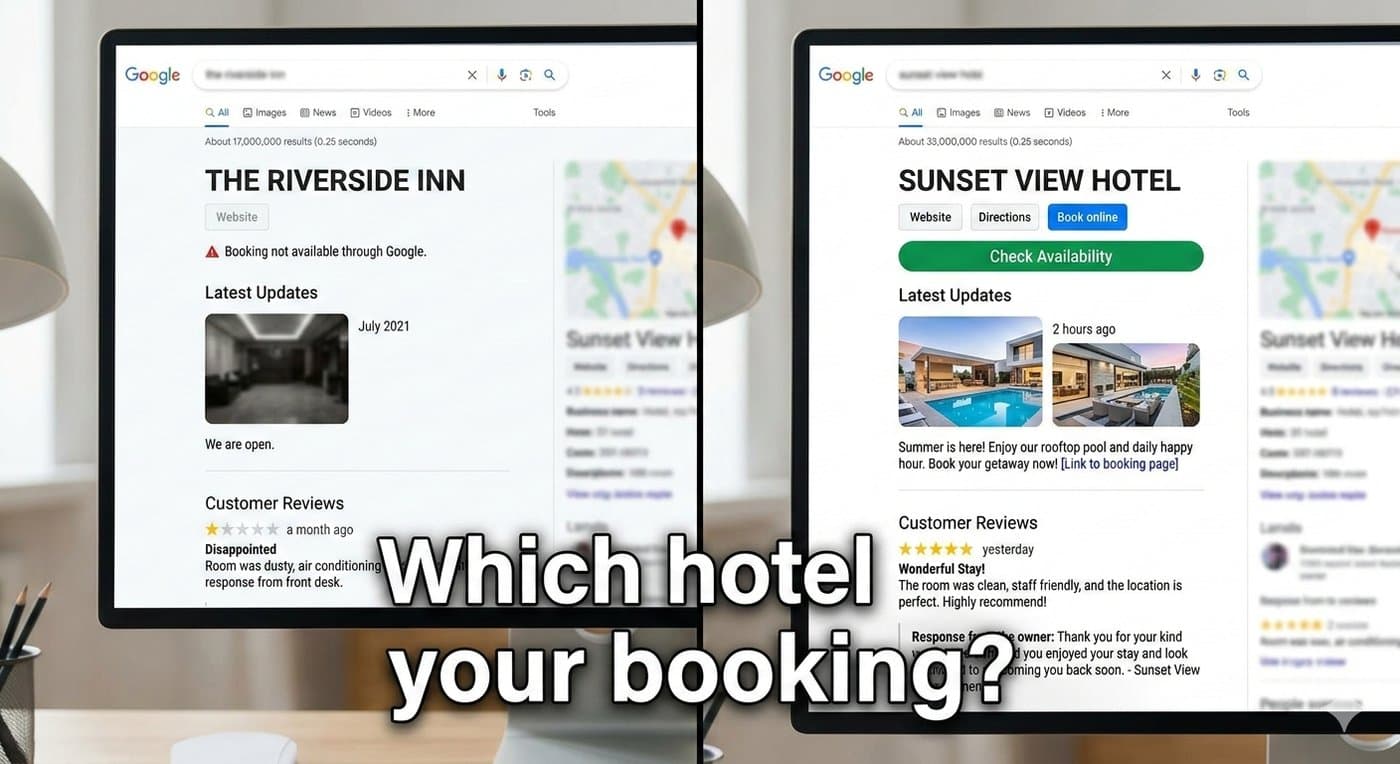
We saw exactly what this looks like in practice with Elsamere Lodge: 124 clicks on their free booking link in six months — zero commission, pure high-intent traffic. The setup steps are covered in our booking engine setup guide.
Review Management
- Respond to every review within 24-48 hours — including, especially, the negative ones
- Thank positive reviewers by name where it feels natural, not with a copy-pasted line
- Watch for patterns in feedback — three guests mentioning the same issue is a signal, not a coincidence
- Ask for reviews at checkout using your profile's review link, and never offer a discount or gift in exchange. It breaks Google's rules and can get reviews removed
- Reply in the language the guest wrote in, English or Swahili. It shows a real person is reading
Want a repeatable process? See how to generate hotel reviews.
Reading Your GBP Insights
Google gives you real data on how people find and interact with your profile. The ones worth actually watching:
- Which search queries you're actually appearing for
- How many people click through to your website vs. call directly
- Direction requests — a real signal of local intent
- Booking link clicks, if you've got one connected
One split worth understanding specifically: Maps views vs. Search views, broken out by mobile and desktop. Maps views come from people actively browsing the map — often comparing you against nearby properties in real time. Search views come from people typing a specific query. Here's what that split typically looks like in practice:
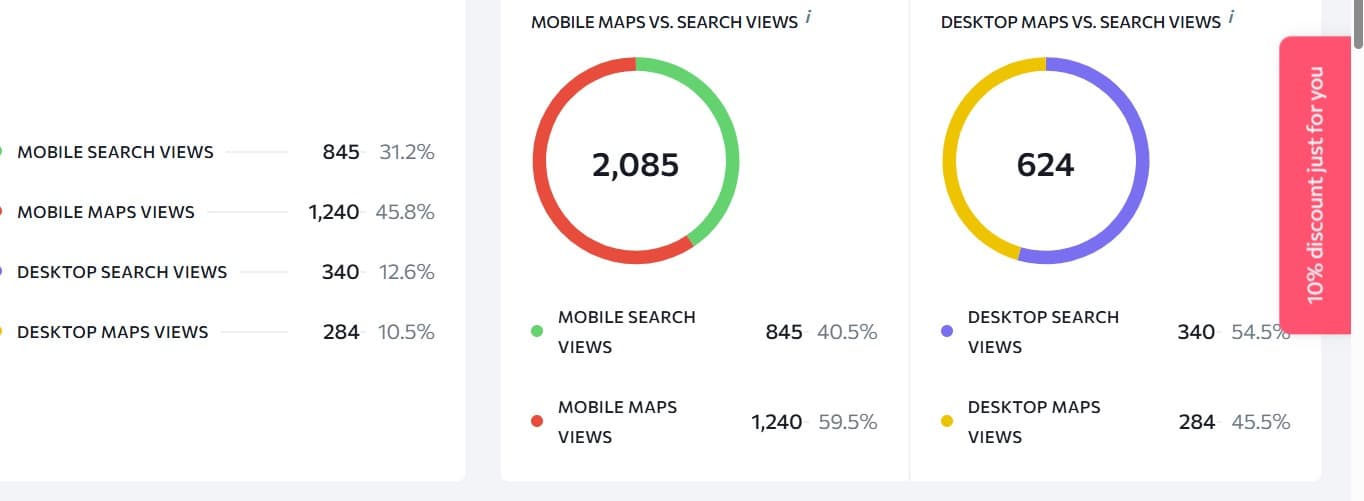
An example of the Maps vs. Search views breakdown in Google Business Profile Insights.
Frequently Asked Questions
Is Google My Business the same as Google Business Profile?
Yes. Google renamed Google My Business to Google Business Profile, so guides and articles using either name are talking about the same free listing.
Does it cost anything?
No. Creating, verifying and managing your profile is free. You only pay if you choose to run Google Ads on top of it.
Can I use a P.O. Box as my hotel's address?
No. Google needs the physical location of your property. If you have no formal street address, place the pin precisely, add a Plus Code, and describe how to find you using landmarks.
How long does verification take?
It varies by method and by your location. Video or phone verification can be quick when offered, while postcards can take noticeably longer, especially for remote properties. If one method stalls, check whether Google offers another.
My hotel doesn't show up on Google Maps. What should I check?
First search for your property name and see whether a profile already exists, because it may be unclaimed or duplicated. Then confirm it's verified, that your category matches what you are, and that the pin sits on your real entrance.
What should I do about a bad review?
Reply calmly within a day or two, acknowledge what went wrong where it's fair, and offer to continue the conversation privately. Future guests read your response as much as the review itself.
Can I delete an unfair or fake review?
You can't delete a review just because it's negative. You can report reviews that break Google's policies, such as spam, fake reviews or off-topic content, and Google decides whether to remove them.
Final Thoughts
A Google Business Profile isn't a listing you set up once and leave. Google treats an actively updated profile as a trust signal, and a stale one as a reason to rank you lower — even if nothing about your actual property changed.
If you only fix one thing from this guide today, check your category. It's the fastest possible win, and it's the one most hotels have quietly wrong.
Related Reading
Want Your Profile Audited?
We'll check your category, booking link setup, and visibility gaps — free.
Get Your Free AuditPrefer to talk it through? Book a free demo and get a quote.