Case Study
A Naivasha Hotel: 8,427 Google Views, 443 Direction Requests, 115 Calls
What a hotel's Google Business Profile looks like when local search is working, and the one number in it that still needs fixing. The property is not named, and every figure below is taken from the profile's own Google dashboard.
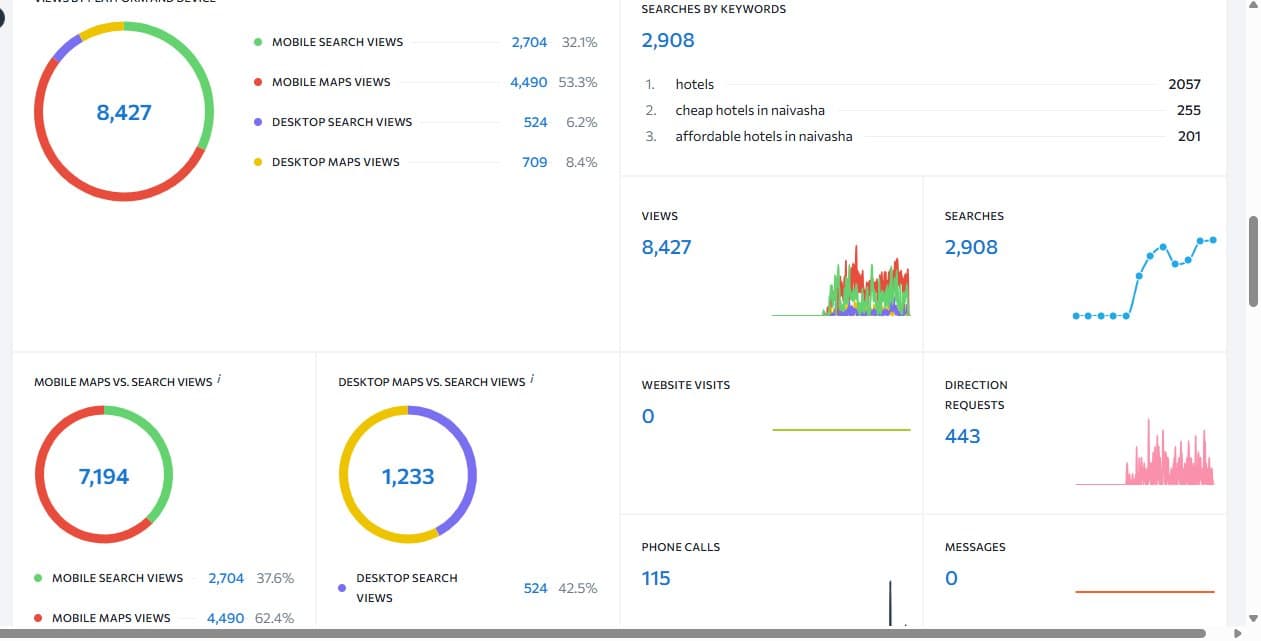
The hotel's Google Business Profile insights. The date range isn't shown in the screenshot.
The Real Numbers
- 8,427 total views of the profile
- 2,908 searches that led to the profile
- 443 direction requests
- 115 phone calls
- 0 website visits and 0 messages recorded
Most Guests Found This Hotel on Their Phone, on the Map
Of the 8,427 views, 4,490 (53.3%) came from mobile Google Maps and another 2,704 (32.1%) from mobile search. That is about 85% of all views on a phone. Desktop made up only around 15%.
For a hotel, that means the first impression happens on a small screen, in the map results, usually while the guest is comparing nearby places to stay. Your photos, rating and category matter more than your website's homepage at that moment. It's the pattern we describe in the Maps vs. Search views section of our Google Business Profile guide.
What People Searched For
Google listed the top searches that led to the profile:
- 1. hotels2,057
- 2. cheap hotels in naivasha255
- 3. affordable hotels in naivasha201
About 71% of those searches were the single word "hotels", which people type when they are near a place and looking for somewhere to stay now. The rest are price-led searches that name Naivasha. That tells a hotel what guests care about: location and affordability, in that order.
The Ranking Map
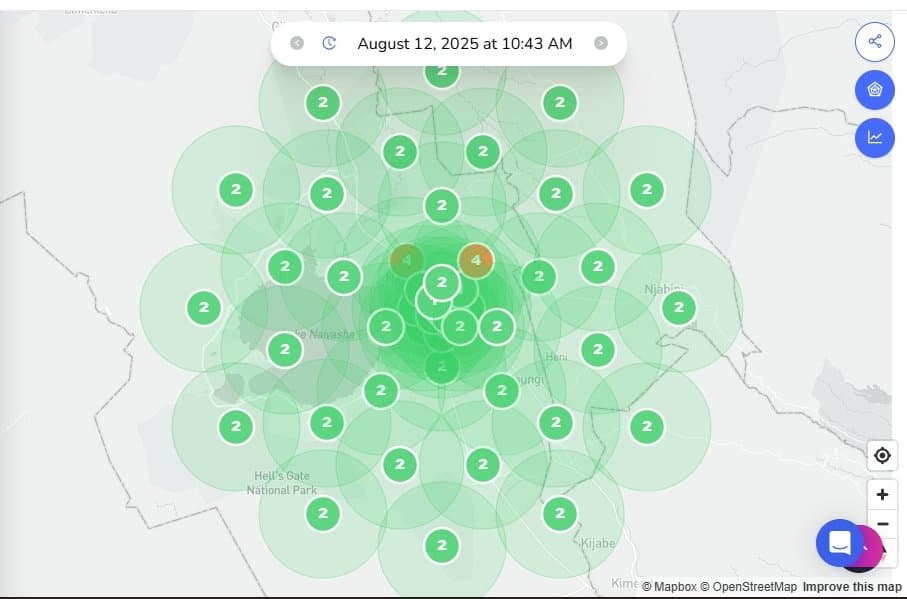
A local ranking grid scan around Lake Naivasha, taken 12 August 2025.
A ranking grid checks where a hotel appears in Google Maps from many points around it, not just from one spot. Each circle shows the hotel's position at that location. Most points on this map show position 2, in green, with only two points near the centre showing position 4. Showing up in the top few results across a wide area, not only next door, is what drives the Maps views above.
The Gap: 558 Actions, 0 Website Visits
Guests asked for directions 443 times and called 115 times. Yet the dashboard shows zero website visits. A hotel getting that much attention should be getting some clicks to its website too.
A zero like this usually means the profile has no website link, the link isn't tracked properly, or guests are being sent somewhere that doesn't register. We can't tell which from a screenshot, but it is the first thing we would check, and it is exactly the kind of leak the booking leak audit looks for. Fixing it, and adding the free Google booking link described in our Google Business Profile guide, would give those guests a way to book directly instead of calling or walking in.
What Hotels Can Take From This
- Optimise your profile for phones first. That is where most guests meet you.
- Your Google Maps ranking, not your website's homepage, is what brings the first views.
- Check your insights for website visits. If they read zero while directions and calls are high, you are losing bookings you have already earned.
- Give guests a direct way to book from the profile so attention turns into revenue without a commission.
More Case Studies
Case Study: Elsamere Lodge
124 free booking link clicks and 205 organic clicks
Case Study: Silent Palms Villa
What early-stage local SEO looks like
Google Business Profile Setup Guide
Categories, photos, posts and the free booking link
Playbook: Turn Local Searches Into Direct Bookings
The step-by-step version
Want Us to Check Your Profile?
We'll look at your Maps visibility, your website and booking links, and where guests are slipping away.
Claim My Free Growth Audit →